
Every new PO, sales order or invoice reaches the correct warehouse team automatically — routed by location, sent on the right channel, with nothing sitting unseen in an inbox.
 Zepto
Zepto Swiggy Instamart
 Amazon
 Flipkart
 Myntra
 DMart
DMart Metro
Metro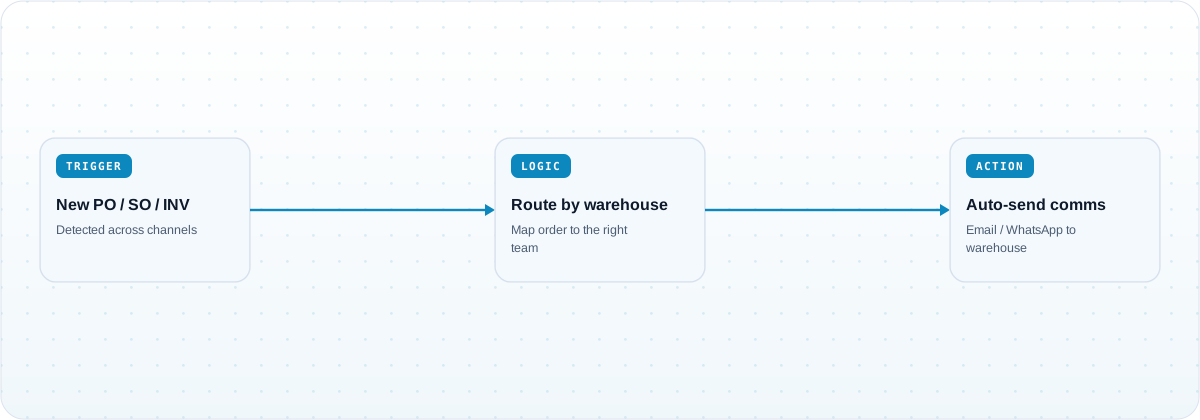
Warehouse teams stop finding out about orders late. Each PO, SO and invoice is routed to the team responsible for that location the moment it exists, so dispatch starts on time instead of after someone forwards an email.
New POs and SOs are pushed to the owning warehouse automatically, so nothing waits for a person to notice and forward it.
Each order maps to the team that fulfils it, so multi-warehouse operations do not rely on manual distribution.
Communications go out by email or WhatsApp in the format each team expects, with the order details attached.
Removing the human relay step shortens the gap between order receipt and pick-pack, protecting the fulfilment window.
Customers run this template across Blinkit, Zepto, Swiggy Instamart, BigBasket, Amazon, Flipkart, Nykaa, Myntra, Noon, Namshi, Trendyol, Zalando, Reliance Retail, DMart and Metro, spanning India, the Middle East and Southeast Asia. Additional channels and systems can be added to the workflow on request.
It automatically sends purchase order, sales order and invoice communications to the warehouse team responsible for each order, routed by location, on the channel that team uses — typically email or WhatsApp — with the order details attached.
Each order is mapped to a warehouse or fulfilment team using location and business rules you configure, so multi-warehouse operations route correctly without manual distribution.
Email and WhatsApp are the common outputs, and other messaging or ticketing destinations can be added through connectors.
See PO, SO and invoice communications routed to your warehouse teams with no manual forwarding.
Book a demo →A workflow template that syncs data reports from every marketplace portal into GCS, BigQue…
A workflow template that ingests POs and punches sales orders or invoices across ERPs, wit…
A workflow template that identifies the cheapest logistics provider per shipment based on …