
Turn incoming purchase orders into validated sales orders or invoices in your ERP automatically — with price, MRP, GST and stock checks running on every line before anything is created.
 Zepto
Zepto Swiggy Instamart
 Amazon
 Flipkart
 Myntra
 DMart
DMart Metro
Metro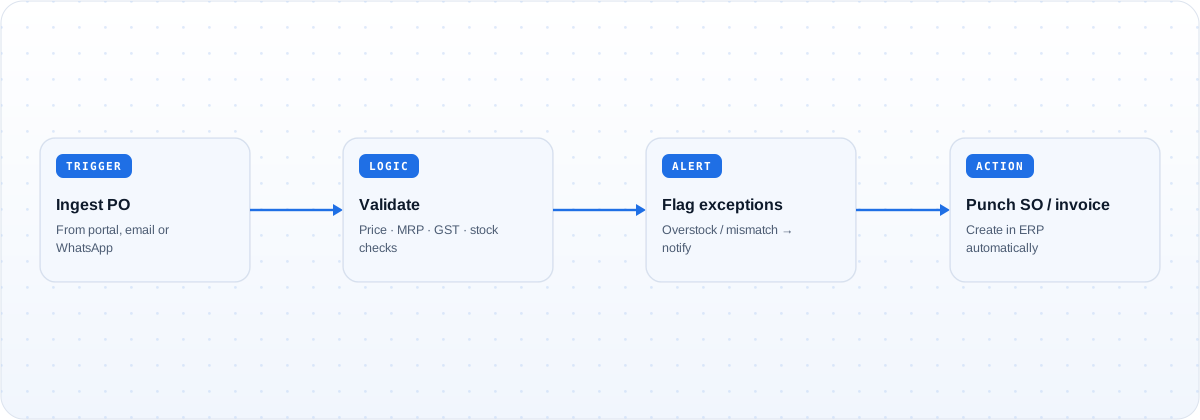
Orders stop being rekeyed by hand and stop carrying errors into the ERP. Every line is checked before a sales order or invoice is created, and only clean orders flow through — exceptions are flagged, not booked.
Validated POs become sales orders or invoices in your ERP with no manual punching, cutting hours of daily data entry.
Price, MRP, GST and case-size checks run on every line, so mismatches are caught upfront instead of surfacing after the order is live.
Overstock and understock checks flag orders that do not fit current inventory, before they are committed.
Anything that fails a check is routed to the owner with the reason attached, rather than silently blocking the queue.
Yogabar. Automating PO ingestion and line-level validation cut Yogabar's order processing time by 90% and brought error detection to 100%, catching issues before they reached the ERP.
Customers run this template across Blinkit, Zepto, Swiggy Instamart, BigBasket, Amazon, Flipkart, Nykaa, Myntra, Noon, Namshi, Trendyol, Zalando, Reliance Retail, DMart and Metro, spanning India, the Middle East and Southeast Asia. Additional channels and systems can be added to the workflow on request.
Every order line is validated against price, MRP, GST, case size and live inventory, including overstock and understock checks, before a sales order or invoice is created. Lines that fail are flagged with the reason rather than being booked.
Sales orders and invoices can be created in SAP, Microsoft Dynamics, Zoho Books, Tally, Odoo, ERPNext and others through pre-built connectors, with a REST or GraphQL step for anything else.
It is not booked. The exception is routed to the owner — by email, WhatsApp or a sheet — with the failing check identified, so it can be corrected before entry rather than fixed after the fact in the ERP.
See POs validated and punched into your ERP automatically, with price, MRP and stock checks on every line.
Book a demo →A workflow template that syncs data reports from every marketplace portal into GCS, BigQue…
A workflow template that automatically sends PO, SO and invoice communications to the righ…
A workflow template that identifies the cheapest logistics provider per shipment based on …